Actor: Start A
Actor: End A
Concurrent Operation Diagram Generator
The diagrams in Linearizability: A Correctness Condition for Concurrent Objects are a nice example of how to show how multiple concurrent operations overlap, and the possibilities for orderings that arise. If you’d like to be able to make similar diagrams, there’s a script that can generate them from a simple text-based description of the operations.
Demo
| Loading... | |
Examples
dbdiag-spans visualizes operations performed by actors, with the x-axis implicitly being time moving forwards.
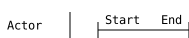
|
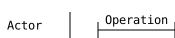
You may label either the start and end, or the overall operation:
Actor: Operation A Actor: END A |
|
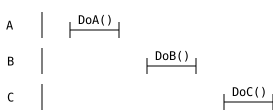
Operations can be performed by multiple actors:
A: DoA() B: DoB() C: DoC() |
|
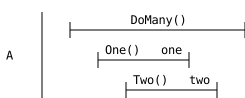
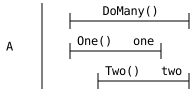
Actors can have multiple concurrent operations.
A: DoMany() M A: One() A A: Two() B A: one A A: two B A: END M |
|
If you want to have multiple operations start or end at the same time, wrap them in [].
[ A: DoMany() M A: One() A ] A: Two() B A: one A [ A: two B A: END M ] |
|
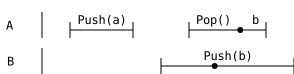
When multiple operations are concurrent, use markers to show how operations serialize in the given example:
A: Push(a) A A: END A B: Push(b) B A: Pop() AA B: EVENT B A: EVENT AA A: b AA B: END B |
|
Or to put everything together:
A: PushAll([a,b,c]) ALL B: Push(z) B: Pop() BZ A: Push(a) A A: END A A: Push(b) B A: EVENT B B: EVENT BZ A: END B A: Push(c) C [ A: END C A: END ALL ] B: Ok(b) BZ |

|
Usage
Clone thisismiller/dbdiag, and it installs a script
dbdiag-spans. The interactive demo above is loading this script via python-in-wasm.
$ dbdiag-spans --help
usage: dbdiag-spans [-h] [-o OUTPUT] [--debug] [--embed] file

positional arguments:
  file                  file of operations

options:
  -h, --help            show this help message and exit
  -o OUTPUT, --output OUTPUT
                        output file path
  --debug               add extra lines to debug alignment issues
  --embed               only use 12px font and px units
It may be invoked as dbdiag-spans.py [--embed] <input_file> -o <output_file.svg>.
By default, the SVG uses the ch and em units to scale with the text size of the document. This does not work well with any viewers or tools other than a webbrowser, so --embed causes only px to be used as units, and the font size fixed to 12px so that lines match up with text.
The input file follows a similar syntax as the paper as well. Each line has three parts:
<ACTOR> [:.]? <OPERATION> [KEY]
Where <> is required and [] is optional.
The ACTOR exists to group spans together. It should either be the object being operated upon, on the entity performing the operations. OPERATION is the text that will be displayed above a span. If the text has spaces, put double quotes around it. KEY can be any identifier, and the first time that a key is seen on a line, the line is interpreted as the start of the span. The next line with the same KEY denotes the end of the span, and the KEY may then be reused.
The operation END is special, and not displayed. Such spans will be shown with the starting operation text centered over the span instead. If an operation starts and immediately finishes, you may omit the KEY. This is semantically equivalent to writing an immediately following line with an END operation.
The operation EVENT is special, and will display a dot along the operation line that the given point. This can be used to signify when the operation atomically occurred between its start and end, if needed.
See discussion of this page on Reddit, Hacker News, and Lobsters.